Red Magnifying Glass on iPhone: How an Unknown Tracker Alert Works
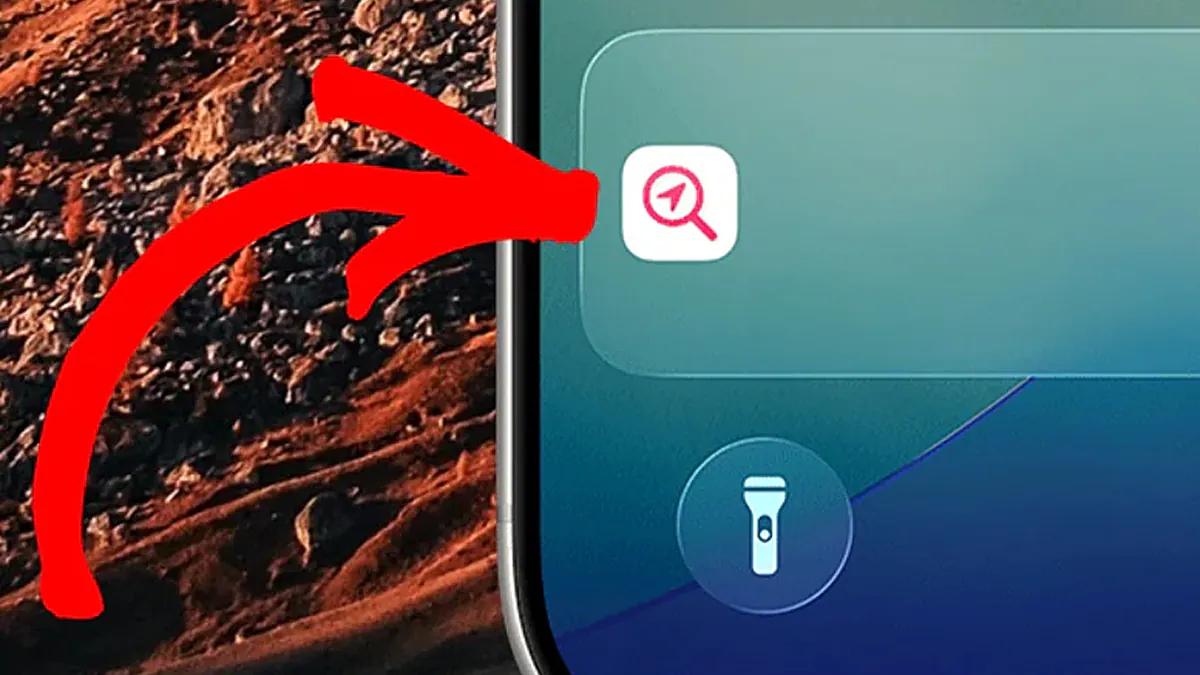
- A red magnifying glass may mean that an unknown tracker has been moving near the user for some time, separately from its owner
- Simply detecting a device does not prove intentional surveillance: the tracker may belong to a relative or be in a borrowed item
- iPhone alerts require Location Services, Bluetooth, tracking notifications, and an up-to-date version of iOS
What the red magnifying glass on an iPhone means
On an iPhone, the red magnifying glass is not just a decorative icon among many ordinary notifications. It may indicate that the smartphone has detected an unknown AirTag or another compatible Bluetooth location-tracking device nearby. Apple designed these alerts as part of its protection against unwanted tracking. However, the appearance of the symbol does not always mean that someone is deliberately trying to track a person: first, it is important to find out exactly which tracker was detected and under what circumstances.
The alert is associated with a specific situation: the tracker is away from its owner but has been moving with another person for some time. In that case, the iPhone may identify the device as unknown to the user and display an alert. It is important to note that the original description does not specify exactly how long it takes for the system to trigger. So the red magnifying glass should be treated as a reason to check the notification, not as standalone proof that the phone's owner is already being tracked.
One type of notification says that an AirTag is moving with the user; a red magnifying glass pointing at a location icon appears beside it. The alert means that someone else could potentially track the user’s location using the detected device. For example, a tracker might be slipped unnoticed into a bag, a clothing pocket, or a car. This explains why the message shouldn’t be dismissed without thought: first, it’s worth finding out where the device came from and why it’s accompanying the person.
A warning is a reason to check the situation
At the same time, finding a tracker does not in itself prove malicious intent. It could belong to a family member or have been left in something the user borrowed. These possibilities matter: the system reports the presence of an unknown device and possible tracking, but it does not determine who left it or why. So the right response is not to ignore the warning, but also not to treat it as conclusive proof of a deliberate attack without checking the circumstances.
For iPhone to warn you about potential tracking, several system features must be enabled. The source lists Location Services, Bluetooth, and tracking notifications; you also need an up-to-date version of iOS. If any feature is disabled or the system isn’t updated, you may not receive the expected alert. This makes checking your settings a practical part of staying safe: simply having an iPhone isn’t enough if the necessary services and notifications aren’t active.
You can check your notification settings under Settings > Notifications. Apple also recommends looking for information about detected devices in the Find My app: Items > Items Detected With You. There, you can view details about any trackers that have been found. These steps help you move from a general alert to information about a specific detection, but the alert still needs to be considered in context—for example, whether the device belongs to someone you know or is attached to an item you borrowed.
Protection from unknown trackers on Android
Protection from unknown Bluetooth trackers is also available on Android, starting with version 6. The description says that devices moving near the user while away from their owner are detected automatically. So this feature is not limited to Apple phones. However, the interface is different: Android displays a red warning symbol rather than a red magnifying glass. Users should focus on the meaning of the notification instead of expecting the same image across different operating systems.
Android supports detection of Apple AirTags, trackers compatible with Google's Find My Device network, and some headphones with tracking features. An alert is triggered when someone else's device moves with a person for some time while being far from its owner. The mention of compatible types is important: this does not mean that every electronic device is guaranteed to be detected. The source does not list all models or specify the exact duration required for an alert to appear.
After tapping the notification, Android displays a map showing places where the phone detected an unknown tracker near the user. The system also lets users make the device play a sound or use nearby search to pinpoint its location more precisely. When the sound is played, the tracker’s owner is not notified. These features give users additional ways to verify the alert and find the source, but they are described specifically for Android; the article does not provide equivalent steps for iPhone.
Detection features and limitations
In practice, these mechanisms make it harder to use AirTags and similar devices for covert tracking. If a tracker is hidden, for example, in someone else’s bicycle or car and moves along with them, their smartphone may detect the device and warn them about possible tracking. This does not mean that every such detection confirms criminal intent, or that the system rules out all instances of surveillance. It means users can receive an alert and check the situation, not determine someone’s motives with certainty.
For an iPhone user, the first step is not to assume they’re being targeted, but to check the alert itself and the available information in Find My. Then it’s worth making sure Location Services, Bluetooth, and tracking notifications are turned on, and that iOS is up to date. If the device is in something borrowed or belongs to a family member, that could explain the alert. If the reason is unclear, it’s still best not to ignore the notification: looking into the circumstances is the only way to tell a harmless coincidence from a potential risk.
The protection described can help detect a tracker moving alongside someone without its owner, but the source material does not promise that an alert will appear in every possible situation. It also does not specify an exact time threshold, a complete list of compatible devices, or a way to determine the intentions of the person who left the tracker. So it is reasonable to interpret the red magnifying glass precisely: as a warning about potential tracking and a reason to check the detected device, but not as proof that someone is deliberately spying on the user.
Source: UNIAN